

Brightspace MCP server and tray app
One click, and your AI knows your whole Brightspace.
A free Brightspace MCP server and tray app: every D2L deadline, grade and announcement, with Claude, GPT, Gemini or any AI telling you what matters.
- 19MCP tools
- 1click to catch up
- 0passwords stored
How it works
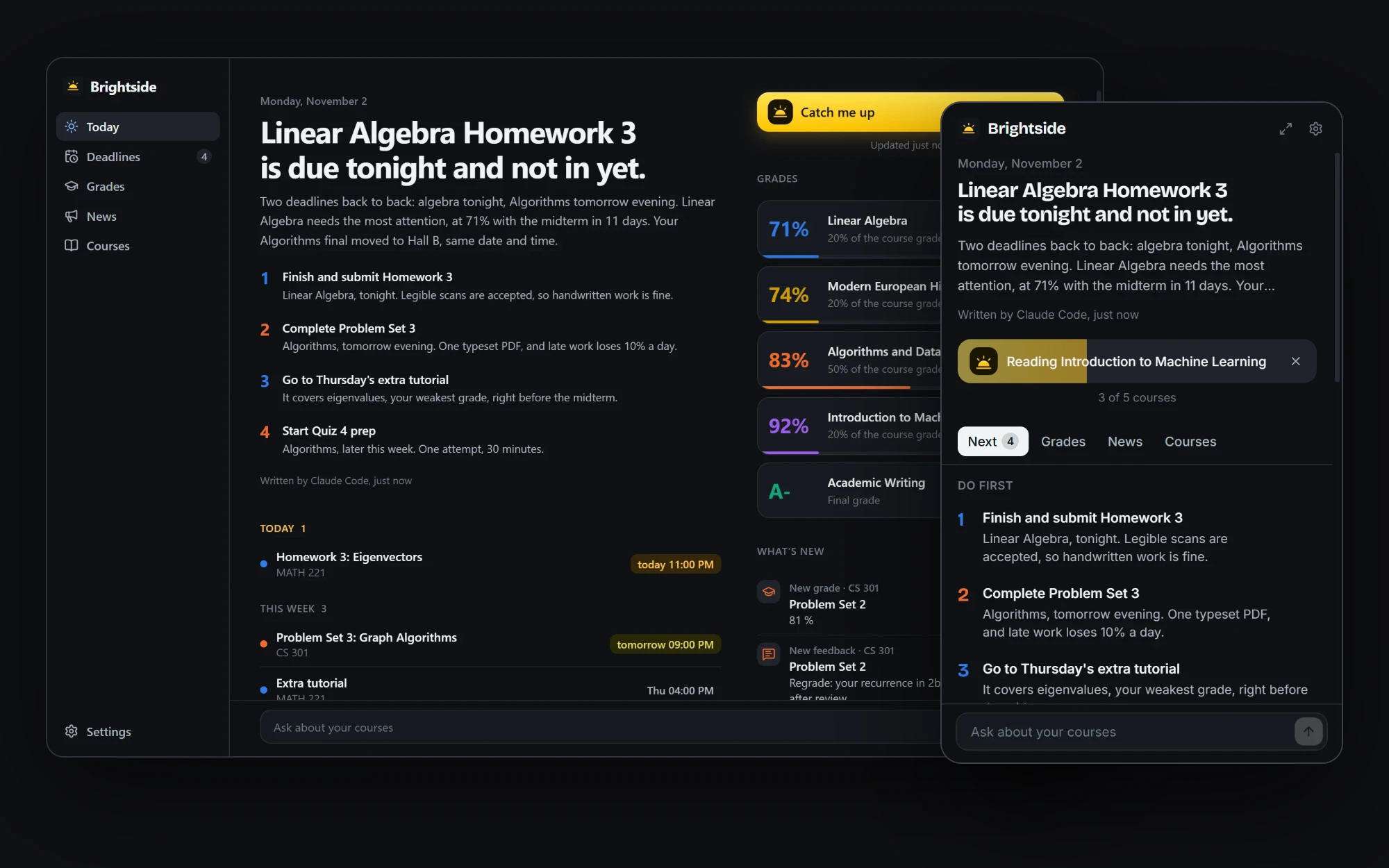
Your semester, in one click (Brightside)
One click
Brightside sits in the system tray. You signed in once, on your school's own page, so all it takes now is one button.
Every course
Deadlines, grades, feedback, announcements, quizzes and calendar events, from every course at once, with no twenty clicks and no missed tab.
Your AI
Claude, GPT, Gemini, Ollama or any other model gets read-only tools over MCP and opens what it needs, like the announcement that moved an exam.
The brief
A short brief and a ranked to-do list. A small quiz tonight can beat a big project next month, and a list sorted by date cannot tell you that.
Grades
Running grades per course, instructor feedback and the exact average you need on the rest of a course to reach your target.
Anywhere
It is a full Brightspace MCP server too, so Claude, Cursor and other AI apps can answer questions from your real slides and syllabus.
About the project
Brightspace knows everything about your semester and shows it to you one course at a time. Brightside puts one button in your system tray that reads every course and hands it to the AI you already use, which tells you what actually matters today.
It is also a full Brightspace MCP server, so Claude, Cursor and other AI apps can answer from your real deadlines, grades, slides and syllabus. Try the real interface in the live demo.
Every school works
You sign in on your school's own page, so Microsoft, Duo, Shibboleth, Google and any other single sign-on or two-factor method work the same. There is no per-school automation to break, no browser to download and no password stored.
Any AI, or none
Claude Code, Ollama, the Anthropic API or any OpenAI-compatible endpoint, including GPT, Gemini, OpenRouter, Groq and LM Studio. With no AI at all, a built-in brief still ranks your deadlines.
Built for text written by strangers
Anyone can write an announcement, so one-click AI runs get read-only tools with no shell and no file access. Course text never becomes HTML, links in a brief must point back to the school, and everything on disk is encrypted with a key held by the operating system.
Features
A brief, not a list
Your AI ranks what matters today, so a small quiz tonight can beat a big project next month.
Grades and what you need
Running grades, instructor feedback and the average you need on the rest of a course to reach a target.
Everything that changed
New grades, new feedback, new announcements and moved deadlines in one feed, with a notification when something lands.
Reads your course files
PDF, Word, PowerPoint and Excel, so your AI can answer from the real slides and the real syllabus.
Read-only by construction
It cannot submit, post or change anything on Brightspace, and neither can an AI using it.
Yours alone
No account, no telemetry and no servers. Traffic goes to your school and to the AI you chose, and nowhere else.
Screenshots
Questions about Brightside
What is a Brightspace MCP server?
MCP, the Model Context Protocol, is the standard way to plug tools into an AI app. A Brightspace MCP server lets an AI like Claude read your D2L Brightspace courses, so you can ask it about deadlines, grades and announcements.
Does it work with my school?
If your school uses D2L Brightspace, yes. You sign in on your school's own page, so any single sign-on or two-factor method works the same.
Does it see my password?
No. You type it into your school's own page. Brightside only keeps the session Brightspace gives you afterwards, encrypted on your computer.
Can it submit assignments?
No. It is read-only by construction and cannot submit, post or change anything.
 Algorithms C++
 Photorunner
Contact
Got a project in mind?
Let's talk.
Tell me briefly what you want to build. I'll reply with a concrete proposal: what goes into the first version, how long it takes and what the steps look like.