

AI browser agent for Edge
Let AI agents drive Microsoft Edge — safely.
An MCP server and Edge extension that give AI agents labelled workspaces, a profile per chat, a side-panel chat and password-manager sign-in without ever exposing a password.
- 38browser tools
- 0passwords exposed to the agent
- 1named pipe, no open ports
How it works
Watch an agent drive Edge (EdgePilot)
Over MCP
EdgePilot connects your AI agent to Microsoft Edge through the Model Context Protocol, so the agent works in a real Edge window next to yours.
Workspaces
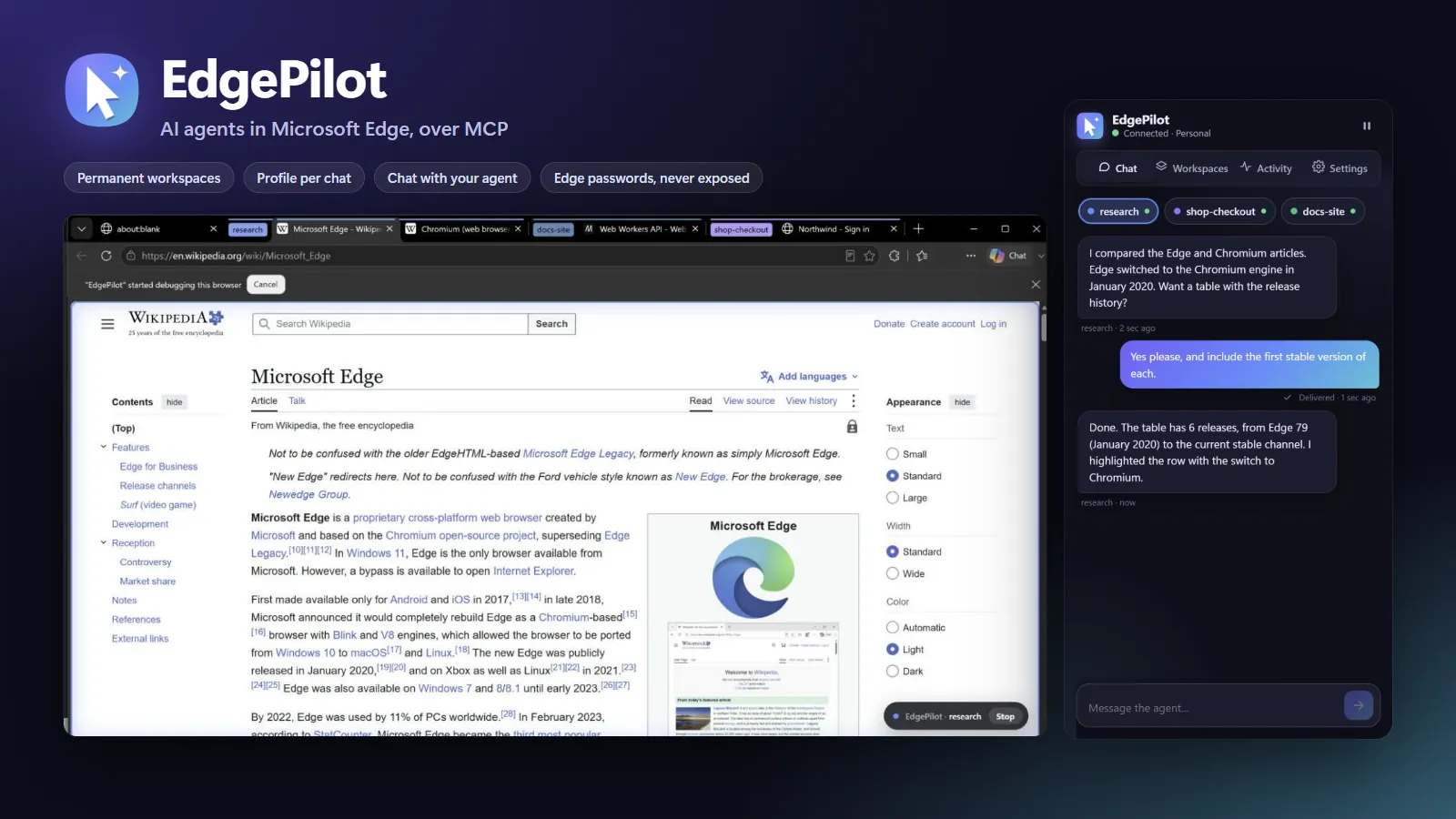
Each chat opens its own tab group, named after the project: research, docs-site, shop-checkout. The labels survive Edge restarts, so tomorrow's chat picks up the same tabs.
Trusted input
It clicks, types, scrolls and reads the page through an accessibility tree with stable references, while a soft glow and a Stop pill show which chat is acting.
Side panel
Every workspace has its own chat in the side panel. Your message reaches the agent live, and the answer comes back in the panel and as an Edge notification.
Password manager
You approve the sign-in in a window the agent cannot click, Edge's own password manager fills the form, and every password value stays masked in what the agent can read.
Control
Pause all agents, stop a single workspace or block whole sites. Every action lands in the activity timeline, across 38 tools for tabs, input, reading, forms, debugging and Edge features.
About the project
EdgePilot connects any MCP client — Claude Code, Cursor, VS Code, Windsurf and others — to Microsoft Edge. Every chat works in its own labelled tab group that survives restarts, so tomorrow's chat in the same project picks up the same tabs.
You stay in control: approvals happen in Edge windows the agent cannot click, password values are masked in everything the agent can read, and a glowing on-page indicator with a Stop button shows exactly when an agent is acting.
Workspaces that stay
Each chat gets its own Edge tab group, labelled with the chat's name. Rename the group in Edge and the workspace follows; restart Edge and it's still there.
Accounts your way
Keep every chat in your usual Edge with your sign-ins, or give a chat its own separate Edge profile with separate cookies, accounts and history — started automatically.
38 tools, one bridge
Trusted mouse and keyboard input, screenshots, an accessibility tree with stable references, table and link extraction, console and network capture, emulation, PDF export, downloads, bookmarks and history — all over a local named pipe, with no network ports opened.
Features
Labelled workspaces
Every chat owns a tab group named after it. Labels survive Edge restarts and follow renames.
A profile per chat
Optional separate Edge profiles with their own cookies, accounts and history, launched automatically.
Side-panel chat
Message your agent from Edge. Messages arrive live as channel events or with its next action; replies come back as notifications.
Password-manager sign-in
You approve in a window the agent can't click; Edge fills the login. The agent only learns that the fields were filled.
Stop at any time
Pause all agents, stop one workspace or press Stop on the glowing on-page indicator. Block sites entirely.
Light on your PC
The debugger detaches from idle tabs after 45 seconds so Edge throttles them normally again.
Screenshots
Get started
- Run the one-line PowerShell installer, or download the release zip and double-click install.cmd.
- Load the extension in Edge: edge://extensions → Developer mode → Load unpacked.
- Connect your MCP client (the installer adds it to Claude Code automatically) and ask your agent to use Edge.
Privacy & safety
- Password values are never returned to the agent; approvals appear in windows it cannot click.
- Blocked sites cannot be read or controlled, including their subdomains and history entries.
- Internal pages (edge://, the add-ons store, the PDF viewer) cannot be controlled.
- Nothing leaves your computer except the pages you visit.
Questions about EdgePilot
Which AI clients work with EdgePilot?
Any client that speaks the Model Context Protocol over stdio: Claude Code, Cursor, VS Code, Windsurf and others.
Can the agent see my passwords?
No. Edge's own password manager fills the login after you approve it in a separate window, and password values are masked in every output the agent can read.
Can several chats share one account?
Yes. In labels mode all chats use the same Edge profile and share its sign-ins; in profile mode each chat can have its own.
Does it open network ports?
No. The bridge listens on a local named pipe protected by a random token. Only when a separate profile is created is a local DevTools port open for a few seconds.
 Photorunner
 PriceSentinel
Contact
Got a project in mind?
Let's talk.
Tell me briefly what you want to build. I'll reply with a concrete proposal: what goes into the first version, how long it takes and what the steps look like.